[First posted at RamblingLibrarian.blogspot.com, 10 Jun 06]
NOTE: THE FOLLOWING STEPS WORK ONLY FOR NON-PROTECTED FILES
Here’s something I learnt — how to convert MP4 audio files to MP3 using iTunes version 7.x (OS X):
[The screens are for iTune versions 7.x. on a Mac. For iTunes version 8, the Import settings has been moved to the “General” pane in “Preferences”. You should see a “Import Settings” button, and then a “Import Using” options. Or check out this post.]
Background: I’d created my Saturday In May in GarageBand and it was saved as an MP4 audio file. Apparently some of my friends were unable to play in that format so I searched for a way to make the conversion. Kevin described broadly how it could be done via iTunes.
I’d also found this freeware called Switch (www.nch.com.au/switch), which worked quite well but I realised iTunes, while a bit cumbersome compared to using a software convertor, allowed more control over the conversion (e.g. setting the bit rate and overall sound quality). So here’s a step-by-step process of how a conversion could be done using iTunes (click on the images for larger sizes):
#1 – Open iTunes:

#2 – At iTunes, select the song you want to convert. In this case, I’ve selected “Saturday In May” among my other song titles:

#3 – Go to your iTunes menu bar, select Preferences (or you can press ‘Command’ and ‘comma’ keys, i.e. “⌘,”):

#4 – At the Preferences window, select the ‘Advanced’ option:

#5 – At the ‘Advanced’ section, click on the button that says ‘Importing’ and then for the part on ‘Import Using’, choose ‘MP3 Encoder’:

#6 – Under Settings, choose ‘Custom’ (you can choose any of the options there, but ‘Custom’ settings ensures you set the right bit rate as you will see in step #7):

#7 – If you’ve selected ‘Custom’, you’ll see this window; just check that your Stereo Bit Rate and Sample Rate are to your desired settings (sorry, I can’t give through explanation on audio settings. I just know that it’s safest to set the Sample Rate at 44.1 khz or else the audio file you upload might playback with a Sped-up High-pitched Chipmunk effect)
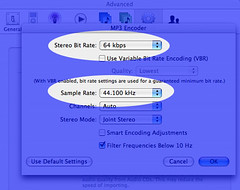
#8 – Close the Preferences window; here I’ll just double check that I’ve selected the right song

#9 – At the iTunes menu, select Advanced -> Convert Selection to MP3 and the conversion would start (note: If you’ve selected something else in Step #5, you’ll see that respective option. E.g. if you’ve selected ‘AAC Encoder’ under ‘Importing’ at Preferences earlier, you’ll see Convert Selection to AAC instead)
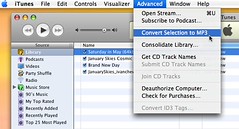
#10 – Once iTunes has completed the conversion, you should now see TWO songs of the same title, like so:

#11 – To confirm, select that song title and press the ‘⌘’ and ‘i’ keys to view the file information, and you should see a new window with the file details:

 My Right Brain
This no longer must work. because after following your directions exactly it says “could not be converted because protected files cannot be converted to other formats.
I want to convert mp4 into mp3 format in ITUNES. I followed your steps but cannot succeed, It says file cannot be found when I select convert MP3
Hello Imb, I think the issue is that your file is protected by some Digital Rights Management or something. Copyright control etc.
This works perfectly on non-copyright controlled tunes. If you add ‘kind’ to your title list you can easily see the converted types even though they have the same name. Excellent work – thanks.
You are awesome!!!!!! I just got a phone that only plays mp3s & all my songs were mp4s. You have put an end to my stress.
Thanks much.
You saved the day. Someone needed a voice over for an audition. I was able to use your info to change this to an MP3 file easily. Thanks SO much.
It didn’t work because the file is protected. Is there a way around that? Your explanation on how to do this was excellent. Thanks for the help.
Hi Ginger, it only works for non-protected files. I’ve amended the post to avoid any confusion. Cheers.
I just got my 2000t and all of my songs are skipping in iTunes, and I cant figure out why. If someone could help me out and tell me how to fix this I would really appreciate it because its driving me crazy. Thanks for the replys.
do you know how to convert them with itunes v4 on a pc? at the top all it says is file-edit-controls-etc… and i can’t find “prefrences” in any of them. do i need a newer version of itunes? thanks
Hi Jonny, I’ve not tried on a PC before. The equivalent of the “Preferences” would be “Options” or maybe it could also be “Preferences ” under one of the menu item. Good luck.
There is a way to get Itunes protected files from M4P to MP3!
Burn the M4Ps to a CD, load the same files from the CD back into the Itunes playlist, go to the folder where the Itunes music is stored, open the folder and there will be two sets of each file. Sort the folder by file type and you now have M4Ps and MP3s of the same files.
At least it works unlike any available software.
Thank you so much. I was beginning to get really frustrated. Thanks!! 🙂
thank you soooooooooooooooooooooo much CMurph – that was so simple, can’t believe I didn’t try that myself. you’re a lifesaver!
As for the other option of going into Preferences, my computer (privately owned – used @ home) itunes says i don’t have enough access priveleges (administrator) or something. weird.
To convert protected music files to MP3 format, there is a software named “NoteBurner” from http://www.noteburner.com can help to convert protected music to MP3 File by using a virtual CD-RW burning method. It works as a virtual CD-RW burner, after selecting “NoteBurner” as default CD burner, then the software will convert all the music files in playlist easily.
trial version has a 3 minute limit! UNLESS you buy the full version.
So simple when you know how! Cheers – youre a diamond!
YOU HELPED ME SOO MUCH… THANK YOU !!!!… IVE BEEN SITTING HERE FOR HOURS TRYING TO FIGURE THIS OUT… YOUR WEBSITE HELPED ME OUT HEAPS…..
THANKS
for anyone having trouble with converting m4a files to mp3 on a pc using iTunes. It’s pretty simple but easily missed, so here goes… all you have to do is go into edit, then preferences. When the preferences screen appears, click on the advanced tab and you should see a drop down menu called Import Using: click on this and scroll down to “MP3 Encoder”, click ok iTunes should automatically make the changes. To change the song to MP3 all you have to do is right click on your chosen song(s) and click “Convert Selection to MP3” iTunes should automatically change the file to MP3 (It makes a copy of the song, one as an M4A file and the other a MP3)
Hope this helped!
Thank you. That worked for me however the convert to mp3 was under the “General” tab not advanced. Then I clicked “Converter Settings” and from there it was like you said. Worked great.
Thanks so much for this tip – worked great!
you little genius! i’ve been really struggling with mp4s and what not and now can change em into mp3s easily. thanks so much!
Thank You so much!!!!!!
I downloaded Virtual DJ and it changed all my songs in Itunes to MPeg4 and I tryed everything. I spent days just getting them to open in Itunes.
How do I do the same thing but using Windows XP and iTunes 7????
Im using Windows XP, i dont know which version of iTunes and it works for me, but i really wish i could copy the music i buy from the music store. I want the Grindhouse sound track on my PSP since my Ipod broke… anyone know of any freeware, option, or trick that can do this?
Hehe, im replying to my own comment but it may help others. For protected music bought of the iTunes music store you can use C murph’s trick which is burning your music to CD, then once it comes up on the side bar in itunes you can use Anon’s trick and it will let you convert them to MP3’s, a little troublesome but worth it.
for those who can’t burn or open copy protected music on ITunes what you have to do is follow the directions on top instead of burning a MP3 file burn a wav file then burn to your hard drive then convert it there to MP3’s then place it back on ITunes its a way but it works
one more thing to cut corners if you us roxio to copy tracks to hard drive you can encode them in MP3’s to a folder. then all you have to do is copy them to a playlist in ITunes I hope this help all of you especially you Goldio and linda . By the way Anon I did try what you said it would not convertto any format. Try this !
thanks heaps!!! i have been wondering too long how to convert mpeg4 to mp3 files. thanks again for posting this 🙂
NoteBurner can do this easier. It installs an virtual drive on your computer and then you can use the program with iTunes together. No matter unprotected or protected, Noteburner can help you burn them on virtual CD abd then rip back tp your hard drive.
thanx sooooo much for that…it helped incredibly…i appreciate it!
should this work with vids, cause i have a nano and i was getting standup comedy clips of the internet in mp4. i just want to get the audio from it. if not is there another way?
Wow! Thank you so much for taking the time to tell us about this. Now I can listen to the program that I purchased with ease thanks to your tutorial.
Have a grat evening.
Lindy
thanks so much for helping us all out! very grateful =)
DUDE thanks sooo much that got me oot of shit creek i tell ye lol. Cheers
I have Vista and I don’t know if that makes a difference or not. It says I cannot convert protected files. I bought everything from iTunes though. Any extra help with that? Should I get the newest version of iTunes?
helped alot !
thanks x
I love you, I wouldn’t have known what to do without your site. Thanks!
Thank you! You made it sooooo much simpler!!
tried all this, including noteburner and burning to disc and re-introducing it. Still NOTHING, I cannot even play the protected files in itunes without the password from the machine onto which the music was downloaded from itunes. There must be a way round this?
Thanks for help.. I was able to get it to work perfectly.
You have no idea how much this helped me. about 2 weeks ago I was grooming my horse and listening to my iPod when I got called away from her, I wasnt thinking when I set it in her feeder and when I came back she had chewed up my earphones and crushed the ipod with her foot. at the time I didnt have the $150 to buy a new one so I bought an MP3 player instead and none of my songs would transfer because they were all MP4’s. You dont know how much trouble you have saved me. thank you SOOOO much!
thanks for giving the information
actually, this can be done by many programs, such as NoteBurner(http://www.noteburner.com) mentioned by Wooden. Besides, I know NoteCable(http://www.notecable.com) can also do this by recording music virtually. You can simply open the program and then add your iTunes music to it and then start to play the music. The music can be recorded and converted to plain mp3 format
okay, this worked for me and it was really easy too. I have a mac os x and itunes 7 and i just recently got the new verizon wireless Juke that only plays mp3s and all of my music was mp4s. If the song is not protected and is a AAC audio file you can drag and drop it on the desktop and then double click to change the name and change it from mp4 to mp3 and a window will pop up asking if you want to change it to mp3 click yes and you now have an mp3 without going through all the itunes windows. Now i have a question, I can change my protected audio files to mp4 and i can get them onto my phone but they dont play because the phone doesn’t read the bitrate does anyone know how to make them play on the Samsung Verizon Wireless?
Babe, thanks so much, it was really helpfull. Cause i has this album with all these songs that really wanted on my mp3 and my downloading thing wasn’t working so this was a really huge help.
Thanks babe xoxo
hi, once i have channged my file from mp4 to mp3 on itunes do i change the format back. The stuff i changed in prefrecnces etc.
So that didnt work
yeah it did i was just wondering if i had to change all the formats back.
Thanks
Thanks for the work. I am putting a Xmas video together with Windows Movie Maker and after following your steps, the music was converted! The internet is amazing!
thanks! 😀
I can not change my protected songs from walmart or itunes to use in photostory. I tried all the above things in itunes …ie changing preferences etc. it still will not open in photo story. I am so frustrated. Where can I get music to use in my photostory?
I just released a drag and drop conversion utility for Windows (we also have a OS X version) that makes this process very simple:
http://www.dekorte.com/projects/shareware/SoundConverter/
Since we just released we are still looking for people to give us feedback! I would be glad to give anyone that mentions this article a free license 🙂
just email me – richcollins@gmail.com
I just gave away my first license to someone that mentioned this page. I can give away 19 more! Email me and I will give you one 🙂
richcollins@gmail.com
try this website:
http://www.m4p-mp3.com
download and convert with a free trial copy for 14 days!! worked for my PROTECTED itunes mp4 files!! i can use them in my editing software! if the above hasn’t worked, try this!
This was very quick to download and it is easy just click and drag, for files over 500K you need a license, but it will convert to mp3 files.
I didn’t have the license so I was not able to try it.
A NEWBIE PROBLEM: bought songs from iTunes with gift of iPod touch; bought a few songs for gf (she has a Zune; buying songs off iTunes on touch is easy, simple and entertaining once account on the computer running iTunes is set up; you’ll need a credit card or paypal account) and found out songs are rightfully PROTECTED in the AAC mp4 format, as converting files to MP3 generate errors due to protection.
SOLUTION: Insert blank CD-R or RW while iTunes is running and it’ll ask if you would like to burn tracks onto the CD. After creating a playlist with songs, initiate burn (very easy). Once done, load CD back onto computer and Zune player (or any in general) can rip it back as MP3, which can then be loaded onto the Zune player (or any other players, including iPods).
Hope this helps…
great tip- Thanks for your help!!
I downloaded the Sound Converter from Rich Collins. It took no time to download. Unfortunately all my files are more than allowed for free. It has many options available for file conversion though.
THANKS so much this was so dumby proof that even I was able to figure it out!!! thanks!!!!
I’ve converted files from .ma4 to .mp3. (Thanks for the help!). HOWEVER, they are now stuck in ITUNES. I am trying copy them onto a 2GB SD Card for use in my GPS Nav system. Any suggestions?
absolutely smashing, thank you! x
Wow thanks so much I was getting really stressed! it worked amazingly!
If if leave the settings the way they are will all the new songs I download be mp3 format? Or will I always have to convert them manually?
Hi TK, the iTunes settings will remain until you change them. So no, you don’t have to go through the steps each time.
This was a huge help to me. Thank you!!!!
Is the 2nd one the MP3 copy?
Thanks soooooo much!
Pingback: iTunes users - clixhere! - clix clix and more clix!
u are the man, just solved my issue for putting a song onto a slideshow software that did not accept mp4! thanks.
Is there a way to do this for the sole purpose of converting the files and not having the new files show up in my library or is there an easy way to get them out once there? I’m converting my CD’s all to my digital library, burning them into lossless files. I’ve used this method to then convert MP4 files to MP3, storing them in another location, but I’m stuck with both copies in my original library. I’m just testing the method now, so with low numbers it’s not a big deal, but with 300+ CD’s this would be very cumbersome to manually delete. Thanks!
thanks big help
hi thanks it realy helped
You’re a star!!!
thanks
i am in the process of trying to create more space on my hard drive. i realized that i have over 7,000 songs in Mp4 format, which at 5 MB per song, adds up quickly!! is there any easy way to locate them all in my library, convert them to mp3, and get rid of the mp4 files?…or will this be my project for the next month and a half?! any suggestions would be much appreciated. Thanks!
Hi this does not work for protected tunes? how can i get them to convet to mp3?
Hey Thank You Very Much For Your Help I was Simply Searching For Softwares To convert the Songs N No its so easy To do it the way u shown
Thans Alot Once Again
This was very helpful. You made my day.
Thanks! This help me out a lot…
dude, you rock- thanks for taking the time to post this. SERIOUS props.
Thanks seems to work for me you rock
Thanks 4 this, even though I don’t have a mac : ( , i was still able to convert my mp4 files 2 mp3, thanks very much (Btw, Preferences should be under Edit, and is the bottom selection in the PC version of iTunes!)
Is there a free virtual cd software for mac? like alcohol 120% in windows?
The most powerful conversion software is TuneCab. It converts DRM-protected and unprotected music, films, video clips, audio books for playing on PCs, mobile phones, MP3 players, MP4 players and iPods, PDAs, PSPs and other devices. http://www.tunecab.com
Thanks may God almighty bless u, this help me a lot i was able to convert from mp4 to mp3 thanks
dude thx!
aaaaaahh. You are awesome! Seriosly!
lol. Thank you oh so very much!
You are a HUGE life shaver!! Thanks so much!!!
thank you soooooooooo much .
😀
You rock. I went to about 100 different sites. All they said was “get the iSync, its easy and fast”. So i tried downloading.. It took for a 100 years! Mann! Then i stumbled across your site and thought, i like the look of it… I think I’ll read it.. And BAM! I am now a very happy person. Other sites don’t make sense. You will be bookmarked and recommended to all my friends! Thank you so much, for your help! Of course it will take time converting it, but it’s better than sitting around, waiting for a program to download and get disappointed in the end. Also, the instructions are SO clear. Lol, sorry, but i’m really happy now! Thanks again;) -I think I’ll stop writing here, otherwise I’ll be rambling on about this forever-
LOL, thanks Happy Person. Your comment made my day. 🙂
You are the best! 🙂
I thank you so much!!!!!!!!!!!!!!!!!!!!!!!!!!!!!!!!!!!!!!!!!!!!!!!!!!!!!!!!!!!!!!!!!!!!!!!!!!!!!!!!!!!!!!!!!!!!!!!!!!!!!!!!!!!!!!!!!!!!!!!!!!!!!!!!!!!!!!!!!!!!!!!!!!!!!!!!!!!!!!!!!!!!!!!!!!!!!!!!!!!!!!!!!!!!!!!!!!!!!!!!!!!!!!!!!!!!!!!!!!!!!!!!!!!!!!!!!!!!!
🙂
Thanks again!
Binh P.
Great tip!
ok, ok, i get it. this will not work on “protected files” is there anyway to Un-protect them? i just blew about $20 on music i can’t use.
Thanks for you help! I’ve been struggling with this problem for a while and you just solved it for me!! You rock!
thank you so much! i was cutting songs and making them into ringtones on itunes. it created them as m4ps and i thoughti was lost. this is actually much easier than some of the softwear you can download, and i dont have to worry about the saftey of the downloads. love you!!
First of all thanks for the play by play instructions… in HUMAN terms so I can follow it easily! 😀 I really appreciate the time you took to show each tiny step, and not assume we knew anything. I do have one question though, I did convert my mp4’s to mp3’s, one at a time successfully, but is there a way to do it continuously, without me having to do one at a time.. is there a way to let it just go one after another til the list is finished? I hope my question is clear enough, not quite sure how to word it. Anyway thanks for all your help so far, and btw, it’s also so great to be able to change my bit rates 😀 big plus! Thanks again. Christina
Pingback: Welcome To - Zubee Wubee Blog » How to convert MP4 audio files to MP3 using iTunes
wow thatnks alotmy samsungmedia studio wouldlet meplay my faveourite bandnowi can
thank you very much for your help!
That was exactly what I needed. Thank you so much!
Thanks I needed to know that
I just used this process on Win xp and it worked great thanks
Thanks a lot mate you just saved my life 😀
Really easy to follow instructions that work a treat! Thx a mill.
Many, many thanks for sharing the instructions on how to convert files to MP3s
You have made this process so much more rewarding and fun.
I was totally lost.
Your efforts are greatly appreciated.
Banjo Bonnie
my files are protected how can i make them unprotected so i can convert them to mp3 format
YOU ROCK! I live and breathe by iTunes and iPod, but my 6-year old son is too young for one, so I bought him a cute little SanDisk Sansa Shaker MP3 Player. Your easy-to-follow instructions made it a breeze to convert his favorite songs from MPEG4 to MP3. I am eternally grateful, I assure you, and so is my son!
Thank you so much i was able to copy my songs to a cell phone that would only accept, .MP3 thankyou so much!!!!!!!!!
You freakin’ rock!!
Doesn’t work – there is no ‘Import Using’ button in the Advanced pane of Preferences. (iTunes 8.0 for Mac).
Graham is right. This method USED to work with previous versions of iTunes, but not with the latest version. Too bad. I need to convert vid files to sound files.
Yeah, the current version doesn’t have the importing option 😦
iTunes 8 has moved it to the “General” pane in “Preferences”. You should see a “Import Settings” button, and then a “Import Using” options.
ive done everything but the last 2 directions the second song hasnt come up and when i click info on the first one it still says aac file – its non protected from a cd, ive tried again but it still doesnt work?! could someone please help me been trying for age!
Gr8 job. You have saved me going looney!
I can get it onto windows movie maker but when i play it no soind comes?
did not work. how do you unprotect a file?
So once I get to the advanced menu there is no “Importing” button anywhere to be found. Do I have too old/new of a version. I’m running on a Mac. Please help!
Thank you very much, it’s a very good tip.
I LOVE YOU!!! THANK YOU SOOOOOOOOOOOOOOOOOOOO MUCH A MILLION AND A HALF.. you made my life! if you want to see the little clip i did and the song i added with your help go to kinneyklan.blogspot.com it’s a very meditatively moving moment to watch…enjoy (just basic, but thanks to you it’s done!)
dat really helped me. im so happy. thank you soooooo much 🙂
Pingback: Track importeren van Garageband naar Cubase - homerecording.be forum
Pingback: garageband - homerecording.be forum
Thaaankyou so much! My mp3 player only plays mp3s which is a pain in the ass and everyone was telling me i couldnt convert my files unless i had windows media player..anyway thank you so much 😀 x
this is great. i am converting about 1,500 songs. It seems that the conversion doesn’t replace the mp4 with an mp3, rather it generates another copy, leaving me with both and then having to delete the mp4 files one at a time. Is there a way to delete the mp4 files all at once? Some way to group them and delete them?
Thanks.
Hi Robert, not that I know of. You’d have to manually delete all the MP4 files. Cheers.
Hi, I’ve got tTunes 8.02, which I’m beginning to think was a mistake…I can find the import settings button in General, but there’s no ‘import using’ option. If I click on the import settings button, the only options are to do with the quality of the import from a cd. As far as I can tell there are no import using options anywhere. Can anyone help me here?
Fi
Oh. I see. There’s no option on the latest iTunes. Why would they do that? That’s so mean. I’ll certainly think twice about downloading new software.
Are there any other ways round it? Would the ‘burning the cd’ thing work for me, do you think? Seems like a huge waste of resources.
Okay! Guess what? I’ve (my friends) have found a solution for itunes 8. It’s completely doable, just a very different path.
On PC, it’s: Preferences>General>Import Settings… Choose MP3 192kbps. Then right-click on song, “Create MP3 Version”.
For Macs, it’s Preferences>General>Import Settings…select import using MP3 encoder. Then select your song. Then go to the advanced button on the toolbar, and click ‘create mp3’.
And now we can all get some sleep….
Thank you to the last poster! You rule and saved me hours of searching.
Pingback: How to convert CD/ MP4 audio files to MP3 using iTunes 8 « My Right Brain
Helped me sooooooo much! Thanks!
thanks. with your tips I was able to convert in itunes 8.0 then download to my garmin
this was great i really appreciate u doing this it helped a lot
GREAT directions! Thanks so much!
:p
GOOD MORNING
all instructions for latest i tunes followed…still unable to convert because file is “protected”?? what the heck does that mean,do the artists sign an exclusive w/apple to only allow mp4 ????…i’ve been emailing itunes for help since christmas day!!! guess i’ll just drop my account & let them know why!!!
best of luck to you guys but i’m done “working around” these people..if apple and microsoft and dell and etc. etc. etc. can’t be bothered to make things we can actually use, then i can certainlly live without them.
hope you all have a great new year
The iTunes instructions work perfectly, however when I load the new mp3’s on my DS Lite they cannot play. Any suggestions?
Thanks.
AHA! It does work on the DS – it just says on the screen file not found, but it does play
prefer to use MelodyCan – http://melodycan.com/
1. easy to use, only a few clicks to put files into my iPod
2. very fast conversion which saved me lots of time – [b]50x[/b]
3. had a good balance between file size and output video quality
4. Support 64 bit OS
5. Nice site + useful information
good discount
THANK YOU SO MUCH!!! YOU ARE SUCH A GREAT PERSON FOR PUBLISHING THIS!!!! I WAS HAVING SUCH A HARD TIME FINDING A CONVERTER, FINALLY FOUND IT AND HAD TROUBLE WITH ALL THE FAKENESS OF THE COMPANY THAT JUST TOOK MY MONEY BUT DIDN’T WANT TO ACTIVATE IT FOR ME. AND NOW VOILA!!! I CAN GET MY MUSIC WITHOUT HASSLE!!! THANK YOU THANK YOU THANK YOU!!!!!!!!!!!!!!!!!!!!!
wow. thank you soooo much. this was the most helpful thing i think ive ever read on the internet. this was so easy and made my life a lot easier. i have to give you your props. thank so much,,,,again O.o
THANK YOUU!!!!!!!!!!!!!!!!!
=D
saved my day.
Thank you so much. If I couldn’t figure out how to do this conversion myself then I”m probably not a computer geek, just a geek. Dumb enough to buy a “non compatible” mp3 player, but thanks to this website I converted the songs I could and can use said mp3 player. THANKS
Hi Mike, we can’t know everything. I think what’s important is we share what we know. Cheers!
I asked a query, but have since resolved it! I am a new user and did not realise that the playlists were also included in “Music” library. Once I opened that, then I could see the converted tunes, but they don’t show in the playlists.
Thanks for your help
Pat
Great advice worked without any problems which is a first!!
THANK YOU!!!! This was so helpful and only took a few minutes.
i did everything but when i went to advanced there wasn’t a convert to mp3…. wut do i do now?
Hi SP, you can’t do the conversion at the Advanced tab. It’s step 8 onwards. Check out the instructions and screenshots I posted. Cheers.
Hey there,
Many thanks for the great info – I’ve had iTunes for about 3 years now, and still don’t really know how to drive it! You’re a legend! Cheers! Mike
i tried doing the pref, mp3 encoder ect…on ituunes. i can convert to ipod,iphone or appletv, but the convert to mp3 is not available to click on. It is there but can’t click on it. I do have itunes 7 version.
Thanks a bunch. It worked and saved my mom a headache that she wouldn’t be able to finish her moviemaker project.
Thanks so muchh, this was an enormous help, i would have had to download a converter for 3 hours over dial-up.
Thanks a bunch.
Thanks so much for the info! I can now finish my mind movie and start attracting even more wonderful things!
READ THIS BEFORE GOING THE ABOVE ROUTE!!!!!
I just right-clicked on the song in Itunes…and chose “create mp3 version”. Took a few seconds. Then I went to the finder menu, accessed my Itunes music files under “music” and found the song folder. In the folder, there are now two versions of the song…and in the name of each, it indicates whether it’s an mp3 or an mp4 version.
I have Mac OS X 10.4.11 and I have Itunes 8.2…don’t know if that’s why it was so easy for me to convert.
Hi April, it’s probably bec. you already have set the Import settings to “Convert to MP3”. 🙂
i feel as cool as mountain spring after getting this done . The daila Lama got s’got nothing on me !
i’m floatin i’m floating .. . heheh .
Thanks .
I CANNOT THANK YOU ENOUGH!!!! BRILLIANT!
thanks for the quick and easy to follow instructions! worked perfectly.
That was super helpful. Thank you!
Scrap this page.
Select song. Right click. Create AAC/MP3 Version. Done.
Dude you are weighing down the internet.
@Toomuchverbagebro – You can do those steps provided you already have specified MP3 or AAC (some people might have selected WAV). Some people need more detailed instructions. Good for you that you don’t. Cheers.
Copy the track from your i-tune list into Real Player and Real Player will add to other media devices other than I-tunes
This is just what I needed!
Thank you SO much. 😀
Now I can put music straight from iTunes into Windows Movie Maker. Thanks again!!!
Thank you so much for your instructions. The fact that you have illustrations made this process so much easier as my phone will only play mp3’s. You’re my hero!
Hey thanks ever so much for great and straightforward instructions!!!!!:)
Hey! I came upon this while looking for ways to convert m4a files to mp3. I’m the true-blue techno-dud! Will someone please let me know if mp4 and m4a files are much the same and whether your tricks above work equally well for m4a files. Thanks a ton!
Cheers
Nadizen.
Hi Nadizen, I did a quick search on the Internet and says here that M4a is the audio layer of MPEG movies. I guess if you can use iTunes to open the M4a file, you should be able to do the same conversion.
Very cool- thanks so much!
I tried to convert my songs in iTunes about 6 months ago and gave up thinking the only way to do this was with additional software. I’m not very tech saavy, so I gave up until today. I decided to search the web again for answers, and you have provided them. Thank you so much.
Your instructions were clear and illustrations helpful, but most importantly, you mentioned what to do with other versions–I have ver. 9.0. I feel so much smarter now because of you. Again, thanks a bunch.
I followed the directions for doing the conversion in iTunes 8 and I was able to change the import settings but I can’t figure out how to import in iTunes 9. Any input will be appreciated. Thanks!
Hi Elaine, as far as I know the steps and settings detailed for iTunes 8 are the same for iTunes9. Maybe you’d want to check your Preferences settings again, in iTunes 9.
hi, i used your directions and it worked easily! yay! just wondering, will all future imports from cd to itunes now be in the form of an mp3? does it matter if i have some files mp3 and some mp4? should i change it back to mp4? sorry hope that made sence! haha i’m not the most technical of people!
Hi lauren, (1) yes the imports will be in MP3 format, or whatever was your last Import setting (i.e. if your setting was WAV, then all imports will be WAV); (2) I think it’ll just convert your MP3 to MP3.
Thanks so much for this.
Pingback: Convert iTunes files to MP3 « PC Serve
Hi, here is some information about mp4 and about other formats and associated software or converters.
Thanks! I was putting music on my friends mp3 player and i realized it wouldn’t play any m4a files. A great help!
Thank you, that was so helpful!
Hey thank you so much! Saved my life! I was trying to put a voice memo from my iPod into a movie in windows movie maker 🙂
for everyone who has a pc(like me) the preference is under edit or is ctrl , thank you!!
Awesome tip -saved me sheds load of time trying to find another converter, thanks !
Also successed in iTunes 9, albeit menus are bit different, but still found them.
You are a star – had to access via slightly different menu options but it worked a treat, and if I can do it, anyone can! Thanks!
Have a method for PC users?
I have iTunes 10.2 but it still worked and thank you so much, I had a mp4 but there was no video so I had to change it to mp3 thanks.
some nice info on these files at http://dotwhat.net/
thanks so much man, trying to figure that out for ages, heeps simple walkthrough!
ur a HELLMAN! im evoking the stoke right now
>>>
ur a HELLMAN! im evoking the stoke right now
>>>
Heh, kinda of a cool compliment 🙂 thanks
Thank you so much!! It was very easy to do. Should I just leave the settings at MP3 forever now? I forgot what I changed it from so I don’t know what to put it back to…I have a mac iBook 10.3……thanks again.
Hi, you can leave the settings there as MP3, until you wish to change it to some other format the next time.
This still works! Thanks so much for posting the info on how to do this. I got a new phone and it will only play MP3 files.
THANKS REALLY WORKING
AWESOME THANK YOU SOOOO MUCH!!! This works great and can now use the files in itunes in moviemaker. People like you make life so much easier for the rest of us. Cheers
Thank You it worked!
Thanks dude, genuinely appreciated.
This info is all available in the Itunes help menu.
Yes it is. And I encourage people to check out the iTunes Help section, which has more detailed information. Except, there’s no screenshots and some people may find the detailed info a bit overwhelming.
latest version of itunes on windows 7 simple. select music, go to advanced on top menu- click create mp3 version and wait. mp3 version will be in same itunes folder as music highlighted along with mpeg4 version— only tried with purchased music from itunes, all my other stuff is riped to mp3 by freerip mp3 at download.com
awesome, i have i pod and got my sons a little mp3 player and was totally confused about to do this or even understand it before i stumbled upon this was trying to burn songs to cd then importing etc lost, but this is sooo easy thanks!!!
Thank you! Thank you! Thank you!
Thank u so much…
For windows just right click on the track and select Create MP3 version. It’s really simple. Then to find the file on your computer just right click on the MP3 version you just created (should be the track below) and select Show in Windows Explorer.
Thanks man for this info, it was really useful. Even with version 9 I manage to convert my files to mp3. I did not know iTunes could do this.
Thanks for the info- I was able to do it in itunes version 9 with no trouble.
Cheers!
thanks! I was going mad trying to figure it out. Easy!
Thanks for the information. Now I can listen to music on my phone at the gym. You’re a genius!
Thanks! Couldn’t figure out how to convert it but I finally found this 🙂
i already know about garage band i just wanna knw how to put it on my mp4
I beat my head against the wall for 2 days trying to figure it out.Its simple…Right click on the song in the libray and it will ask …Create MP3 version? You get the rest. To create an imported cd MP3 version go to edit, select preferences…on the general tab is a drop down box..”When you insert a CD.” Make your selection then go to import settings and there is a dropdown box to select MP3 encoder. Worked for me. Listening to Rammstein on a MP3 audio disk now. Hope this helps.
OOPS Sorry…That was on I-Tunes 10…suggest you upgrade!
OMG!!!!!! THANK YOU THANK YOU THANK YOU!!!! I was aleady pulling my hai out because I was getting so fusteated and confused… Thanks so much fo the help…
Thank you soo muchh i don’t have that version but it was similar and i am now a v.v.v. happpyy persoonn THANKSS!! 😀
Hi, just wanted to thank you for posting this information…my 9 year old son was bugging me to transfer some songs which would not play on his mp4 player until I converted the song files from mp4 format to mp3. He is now happy and so am I! Thank You!
Hey Zahir, you might be the first parent to comment here! LOL
Although my iTunes menus are slightly different, I was able to figure all of this out on the first try and just converted some MP4’s to MP3’s without any other help other than your information above. I am extremely grateful. Thank you!
-Isabel
I can’t find how to convert MPEG4 to MP3 in ITunes version 10. Can somebody show me?
Thanks,
-Young
The files on iTunes version 10 are all AAC, and converting them this way just changes them to MPEG. I’ve been wanting to use songs from iTunes for Windows Movie Maker, but none of the file types are compatible (.wav .aif .aiff .aifc .snd .mp3 .au .mpa .mp2 .wma and .asf).
Any advice on how to get this to work?
Thanks for the help. There are numerous sites that offer this. I’ve found another way of converting mp4 files. Try this http://mp4converting.com
Pingback: mp4 aac - I don't feel 50 Forums
Anon, thanks for your advice, I was having the same problem and your instructions did the trick!
This is great! I had to buy a SD card to play on new VW Golf which only plays MP3s, but all the ongs were mpegs… this is awesome!
Thanks!
Figured it out by reading help! – iTunes 10 – edit, preferences, general: “When you insert a CD: Ask to import CD: Import Settings,” click on import settings, change from AAC Encoder to MP3 Encoder – now you can click on your song and choose “create MP3 version;” you can also do WAV files and a couple of others.
Thankyou! Thankyou! Thankyou! to all who have contributed to this post. I’ve been trying to stream itunes to my internet tv for months and have finally figured out that I need to convert from mp4 to mp3. This has given me the tools to do just that. Finally some music is back in my home!
Thank you for your tutorial. I can now populate my daughter’s new MP3 players, which is not an Apple product.
So this doesnot work from a dvd i guess…i have been trying to import from DVD and so far no luck…
Fantastic! Thank you so much. You saved me from such a headache.
Thank you so much you saved my school assignment!!!! it worked perfectly!
PERFECT!!!!! My boyfriend has a different version of MacBook, so we did the following:
Under Preferences, select General, then click the Import Settings button, Import Using: MP3 Encoder, follow Custom Setting from above.
To convert, go to Advanced, choose Create MP3.
It worked for me! I’m not sure what version of itunes I am using but the screen shots were a little different of course. I went to edit, then preferences. The difference was that “import” was not under the advanced tab. I found that part under “general” and “when you import a cd section” – Click import settings and continue to follow his instructions. It took a few minutes, but the second version (mp3 format) did show up!… THANK YOU!
If you have itunes 11 you can just right click on the song and click create mp3 version.
Tank you!! you saved my day. Im using Windows XP, I went to edit, then preferences, in the general tab click import settings and continue to follow his instructions. Then you can right click on the file you want to import to mp3.
Thanks. Always wanted to do that.
Thanks so much. It worked great!!
What are you supposed to do if you have a PC???
Try looking for “Options” under the File menu item.
You saved my life!!! Thank you so much for these directions, so clear and easy to follow. PERFECT
Thank you thank you thank you!! I’m working on a tribute for my grandma’s funeral and you literally just saves me from tears! Thank you!
Thanks so much! Your steps were easy to follow-saved me paying for a converter. Thanks
thank you !! I can enjoy my musics…ks
Thanks for your help everyone. Elisa, I’m working on a tribute for a funeral too. i found simple way was to right click on the song in itunes, then click ‘convert to mp3’, save the song to a folder and use it from there. I was able to use it in Windows Moviemaker allelhuia!
Hey, thanks a lot. I did this on windows, and it worked just fine. The directions were a little bit different, but it wasn’t too hard to figure it out.
WOHOO!!!!!
Thanks!!! This is so so helpful!
Pingback: I Tunes Help
Thank you so, so much!! Finally I can listen to my most treasured music on my battered, old mp3 player! You are a genius!
very,very helpful!!!thaank u sooo much!!1
You are a god! I desperately needed this for a college audition, thanks to daniellecoleman too I’m using a PC and her advice helped!
That is perfect. Thanks dude!
THANK YOU SO MUCH! I had music on one computer and video on another and neither would convert to be accepted on the other. This just saved me. YOU ARE AMAZING!
Been to several convert sites. All have failed on my PC/iTunes. The song does not duplicate nor become mp3?
Soooo helpful thank you so much!! 🙂
Hi I can’t do any of that I got on to preferences then I selected advanced but I got nothing to be able to select what mp3 I want. What do I do
Pingback: How To Export Wechat Audio | WhatsAPP and Wechat